What is Problem Steps Recorder and why would you want to use it? PSR is a useful tool which allows you to capture every step of a process. As an example of its utility: if you get a repeated error message, you can start PSR and then record each step while you recreate the error.
- In Windows 8 and 8.1 Search for “PSR”
![How to Utilize the Problem Steps Recorder for Windows]()
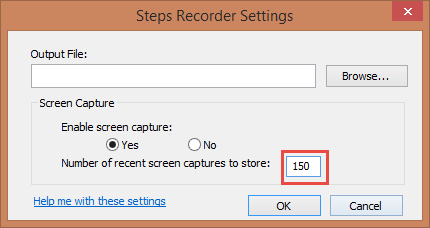
- This is the main window. Click the down arrow and select settings to increase how many screenshots it will take.
![How to Utilize the Problem Steps Recorder for Windows]()
- The default is 30. Set it to the maximum of 150. This resets every time, so always remember to increase the maximum number of screenshots. *Windows 7 default 25 and max1
![How to Utilize the Problem Steps Recorder for Windows]()
- Click Start Record
![How to Utilize the Problem Steps Recorder for Windows]()
- These are your options while recording:
![How to Utilize the Problem Steps Recorder for Windows]()
![derek5]()
- This is the main window. Click the down arrow and select settings to increase how many screenshots it will take.





- Pause – interrupt your recording if you need to move things around without taking a screenshot of each step
- Stop – When finished recording, click Stop. Concludes the recording and allows you to review the steps captured
- Comment – allows you to draw a highlighting box and type a comment. Useful for providing extra detail and/or drawing attention to a specific area
![How to Utilize the Problem Steps Recorder for Windows]()
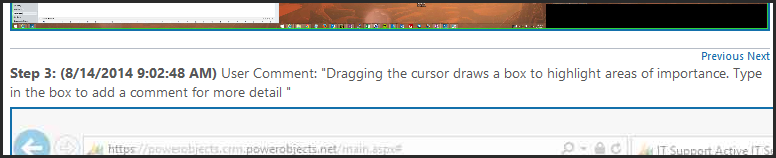
All monitors will be displayed by default. To display only one monitor, you need to disconnect the other monitors through your display settings prior to starting a Recording.
6. Review recorded steps. Click on an image to expand it to full size

7. Save the document, then share it with a colleague or attach it to a support ticket

At the end of the day using this tool will help you tell the story of an error you are running into, or the process you want someone to follow click for click! This is super helpful for Support teams or IT errors. Head on over to our Support page for even more great information!
The post How to Utilize the Problem Steps Recorder for Windows appeared first on PowerObjects.